Direct Manipulation: A Step Beyond Programming Languages
This paper is under a licence that does not allow it to be reproduced, so what is here is its front matter and a short abstract. Read it at the publisher's page.
Direct manipulation systems offer the satisfying experience of operating on visible objects. The computer becomes transparent, and users can concentrate on their tasks.
Direct Manipulation: A Step Beyond Programming Languages
Ben Shneiderman, University of Maryland
Leibniz sought to make the form of a symbol reflect its content. "In signs," he wrote, "one sees an advantage for discovery that is greatest when they express the exact nature of a thing briefly and, as it were, picture it; then, indeed, the labor of thought is wonderfully diminished."
Frederick Kreiling, "Leibniz," Scientific American, May 1968
Certain interactive systems generate glowing enthusiasm among users—in marked contrast with the more common reaction of grudging acceptance or outright hostility. The enthusiastic users' reports are filled with positive feelings regarding
• mastery of the system, • competence in the performance of their task, • ease in learning the system originally and in assimilating advanced features, • confidence in their capacity to retain mastery over time, • enjoyment in using the system, • eagerness to show it off to novices, and • desire to explore more powerful aspects of the system.
These feelings are not, of course, universal, but the amalgam does convey an image of the truly pleased user. As I talked with these enthusiasts and examined the systems they used, I began to develop a model of the features that produced such delight. The central ideas seemed to be visibility of the object of interest; rapid, reversible, incremental actions; and replacement of complex command language syntax by direct manipulation of the object of interest—hence the term "direct manipulation."
Examples of direct manipulation systems
No single system has all the attributes or design features that I admire—that may be impossible—but those described below have enough to win the enthusiastic support of many users.
Display editors. "Once you've used a display editor, you'll never want to go back to a line editor. You'll be spoiled." This reaction is typical of those who use full-page display editors, who are great advocates of their systems over line-oriented text editors. I heard similar comments from users of stand-alone word processors such as the Wang system and from users of display editors such as EMACS on the MIT/Honeywell Multics system or "vi" (for visual editor) on the Unix system. A beaming advocate called EMACS "the one true editor."
Roberts¹ found that the overall performance time of display editors is only half that of line-oriented editors, and since display editors also reduce training time, the evidence supports the enthusiasm of display editor devotees. Furthermore, office automation evaluations consistently favor full-page display editors for secretarial and executive use.
The advantages of display editors include
Display of a full 24 to 66 lines of text. This full display enables viewing each sentence in context and simplifies reading and scanning the document. By contrast, the
A portion of this article was derived from the author's keynote address at the NYU Symposium on User Interfaces, "The Future of Interactive Systems and the Emergence of Direct Manipulation," published in Human Factors in Interactive Computer Systems, Y. Vassiliou, ed., Ablex Publishing Co., Norwood, N.J., 1983.
one-line-at-a-time view offered by line editors is like seeing the world through a narrow cardboard tube.
Display of the document in its final form. Eliminating the clutter of formatting commands also simplifies reading and scanning the document. Tables, lists, page breaks, skipped lines, section headings, centered text, and figures can be viewed in the form that will be printed. The annoyance and delay of debugging the format commands is eliminated because the errors are immediately apparent.
Cursor action that is visible to the user. Seeing an arrow, underscore, or blinking box on the screen gives the operator a clear sense of where to focus attention and apply action.
Cursor motion through physically obvious and intuitively natural means. Arrow keys or devices such as a mouse, joystick, or graphics tablet provide natural physical mechanisms for moving the cursor. This is in marked contrast with commands such as UP 6, which require an operator to convert the physical action into correct syntactic form and which may be difficult to learn, hard to recall, and a source of frustrating errors.
Labeled buttons for action. Many display editors have buttons etched with commands such as INSERT, DELETE, CENTER, UNDERLINE, SUPERSCRIPT, BOLD, or LOCATE. They act as a permanent menu selection display, reminding the operator of the features and obviating memorization of a complex command-language syntax. Some editors provide basic functionality with only 10 or 15 labeled buttons, and a specially marked button may be the gateway to advanced or infrequently used features offered on the screen in menu form.
EDIT --- SPFDEMO.MYLIB.PLI(COINS) - 01.04 ---------------------- COLUMNS 001 072 COMMAND INPUT ===> ****** *************************** TOP OF DATA ***************************** 000100 COINS: 000200 PROCEDURE OPTIONS (MAIN); 000300 DECLARE 000400 COUNT FIXED BINARY (31) AUTOMATIC INIT (1), 000500 HALVES FIXED BINARY (31), 000600 QUARTERS FIXED BINARY (31), 000700 DIMES FIXED BINARY (31), I3 NICKELS FIXED BINARY (31), 000900 SYSPRINT FILE STREAM OUTPUT PRINT; 001000 DO HALVES = 100 TO 0 BY -50; 001100 DO QUARTERS = (100 - HALVES) TO 0 BY -25; 001200 DO DIMES = ((100 - HALVES - QUARTERS)/10)10 TO 0 BY -10; 001300 NICKELS = 100 - HALVES - QUARTERS - DIMES; D _ PUT FILE(SYSPRINT) DATA(COUNT,HALVES,QUARTERS,DIMES,NICKELS); 001500 COUNT = COUNT + 1; 001600 END; 001700 END; 001800 END; 001900 END COINS; ***** *************************** BOTTOM OF DATA *****************************
EDIT --- SPFDEMO.MYLIB.PLI(COINS) - 01.04 ---------------------- COLUMNS 001 072 COMMAND INPUT ===> ****** *************************** TOP OF DATA ***************************** 000100 COINS: 000200 PROCEDURE OPTIONS (MAIN); 000300 DECLARE 000400 COUNT FIXED BINARY (31) AUTOMATIC INIT (1), 000500 HALVES FIXED BINARY (31), 000600 QUARTERS FIXED BINARY (31), 000700 DIMES FIXED BINARY (31), 000800 NICKELS FIXED BINARY (31), ..... ..... ..... 000900 SYSPRINT FILE STREAM OUTPUT PRINT; 001000 DO HALVES = 100 TO 0 BY -50; 001100 DO QUARTERS = (100 - HALVES) TO 0 BY -25; 001200 DO DIMES = ((100 - HALVES - QUARTERS)/10)10 TO 0 BY -10; 001300 NICKELS = 100 - HALVES - QUARTERS - DIMES; 001500 COUNT = COUNT + 1; 001600 END; 001700 END; 001800 END; 001900 END COINS; ***** *************************** BOTTOM OF DATA *****************************
Figure 1. This example from the IBM SPF display editor shows 19 lines of a PL/I program. The commands to insert three lines (I3) and to delete one line (D or D1) are typed on the appropriate lines in the first screen display. Pressing ENTER causes commands to be executed and the cursor to be placed at the beginning of the inserted line. New program statements can be typed directly in their required positions. Control keys move the cursor around the text to positions where changes are made by overstriking. A delete key causes the character under the cursor to be deleted and the text to the left to be shifted over. After pressing an insert key, the user can type text in place. Programmed function keys allow movement of the window forwards, backwards, left, and right over the text. (Examples courtesy of IBM.)
Immediate display of the results of an action. When a button is pressed to move the cursor or center the text, the results appear on the screen immediately. Deletions are apparent at once, since the character, word, or line is erased and the remaining text rearranged. Similarly, insertions or text movements are shown after each keystroke or function button press. Line editors, on the other hand, require a print or display command before the results of a change can be seen.
Rapid action and display. Most display editors are designed to operate at high speeds: 120 characters per second (1200 baud), a full page in a second (9600 baud), or even faster. This high display rate coupled with short response time produces a thrilling sense of power and speed. Cursors can be moved quickly, large amounts of text can be scanned rapidly, and the results of commands can be shown almost instantaneously. Rapid action also reduces the need for additional commands, thereby simplifying product design and decreasing learning time. Line editors operating at 30 characters per second with three- to eight-second response times seem sluggish in comparison. Speeding up line editors adds to their attractiveness, but they still lack features such as direct overtyping, deletion, and insertion.
Easily reversible commands. Mistakes in entering text can be easily corrected by backspacing and overstriking. Simple changes can be made by moving the cursor to the problem area and overstriking, inserting, or deleting characters, words, or lines. A useful design strategy is to include natural inverse operations for each operation. Carroll² has shown that congruent pairs of operations are easy to learn. As an alternative, many display editors offer a simple UNDO command that cancels the previous command or command sequence and returns the text to its previous state. This easy reversibility reduces user anxiety about making mistakes or destroying a file.
The large market for display editors generates active competition, which accelerates evolutionary design refinements. Figure 1 illustrates the current capabilities of an IBM display editor.
Visicalc. Visicorp’s innovative financial forecasting program, called Visicalc, was the product of a Harvard MBA student, who was frustrated by the time needed to carry out multiple calculations in a graduate business course. Described as an “instantly calculating electronic worksheet” in the user’s manual, it permits computation and display of results across 254 rows and 63 columns and is programmed without a traditional procedural control structure. For example, positional declarations can prescribe that column 4 displays the sum of columns 1 through 3; then every time a value in the first three columns changes, the fourth column changes as well. Complex dependencies among manufacturing costs, distribution costs, sales revenue, commissions, and profits can be stored for several sales districts and months so that the impact of changes on profits is immediately apparent.
Since Visicalc simulates an accountant’s worksheet, it is easy for novices to comprehend. The display of 20 rows and up to nine columns, with the provision for multiple windows, gives the user sufficient visibility to easily scan information and explore relationships among entries (see Figure 2). The command language for setting up the worksheet can be tricky for novices to learn and for infrequent users to remember, but most users need learn only the basic commands. According to Visicalc’s distributor, “It jumps,” and the user’s delight in watching this propagation of changes cross the screen helps explain its appeal.
Figure.
August 1983
Spatial data management. The developers of the prototype spatial data management system³ attribute the basic idea to Nicholas Negroponte of MIT.
In one scenario, a user seated before a color graphics display of the world zooms in on the Pacific to see markers for military ship convoys. Moving a joystick fills the screen with silhouettes of individual ships, which can be zoomed in on to display structural details or, ultimately, a full-color picture of the captain. (See Figure 3.)
In another scenario, icons representing different aspects of a corporation, such as personnel, organization, travel, production, or schedules, are shown on a screen. Moving the joystick and zooming in on objects takes users through complex “information spaces” or “I-spaces” to locate the item of interest. For example, when they select a department from a building floor
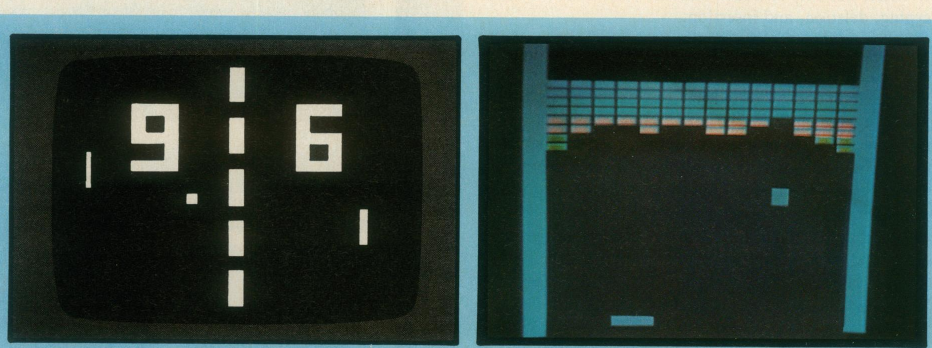
In 1971, about the only people playing video games were students in computer science laboratories. By 1973, however, millions of people were familiar with at least one video game—Pong (above left). A few years later came Breakout (above right), which, according to many designers, was the first true video game and the best one ever invented. Pong and other early games imitated real life, but Breakout could not have existed in any medium other than video. In the game, a single paddle directed a ball toward a wall of color bricks; contact made a brick vanish and changed the ball’s speed.
When the first arcade video game, Computer Space, went on location in a Sears store, its joystick was torn off before the end of the first day. As a result, game designers have sought controls that were both easy to use and hard to destroy. Centipede (above left) uses simple controls—a trackball and one button. On the other hand, Defender (above right) has five buttons and a joystick; novice players are confused by these relatively complex controls and usually give up after a few seconds.
plan, individual offices become visible. Moving the cursor into a room brings the room’s details onto the screen. If they choose the wrong room, they merely back out and try another. The lost effort is minimal, and no stigma is attached to the error.
The success of a spatial data management system depends on the designer’s skill in choosing icons, graphical representations, and data layouts that are natural and easily understood. Even anxious users enjoy zooming in and out or gliding over data with a joystick, and they quickly demand additional power and data.
Video games. Perhaps the most exciting, well-engineered—certainly, the most successful—application of direct manipulation is in the world of video games. An early, but simple and popular, game called Pong required the user to rotate a knob, which moved a white rectangle on the screen. A white spot acted as a Ping-Pong ball, which ricocheted off the wall and had to be hit back by the movable white rectangle. The user developed skill involving speed and accuracy in placement of the “paddle” to keep the increasingly speedy ball from getting by, while the speaker emitted a ponging sound when the ball bounced. Watching someone else play for 30 seconds was all the training needed to become a competent novice, but many hours of practice were required to become a skilled expert.
Contemporary games such as Missile Command, Donkey Kong, Pac Man, Tempest, Tron, Centipede, or Space Invaders are far more sophisticated in their rules, color graphics, and sound effects (see sidebar below and on facing page). The designers of these games have provided stimulating entertainment, a challenge for novices and experts, and many intriguing lessons in the human factors of interface design—somehow they have found a way to get people to put coins into the sides of computers. The strong attraction of these games contrasts markedly with the anxiety and resistance many users experience toward office automation equipment.
Because their fields of action are abstractions of reality, these games are easily understood—learning is by analogy. A general idea of the game can be gained by watching the on-line automatic demonstration that runs continuously on the screen, and the basic principles can be learned in a few minutes by watching a knowledgeable player. But there are ample complexities to entice many hours and quarters from experts. The range of skill accommodated is admirable.
The commands are physical actions, such as button presses, joystick motions, or knob rotations, whose results appear immediately on the screen. Since there is no syntax, there are no syntax error messages. If users move their spaceships too far left, then they merely use the natural inverse operation of moving back to the right. Error messages are unnecessary because the results of actions are so obvious and easily reversed. These principles can be applied to office automation, personal computing, and other interactive environments.
Donkey Kong, Space Invaders, and Tron (clockwise from above) exemplify the lively variety of video games now inviting the user’s loose change. As of mid-1981, according to Steve Bloom, author of Video Invaders, more than four billion quarters had been dropped into Space Invaders games around the world—that’s roughly “one game per earthling.”
Video game photos reprinted courtesy of IEEE Spectrum. For a more complete report on the topic, see “Video Games: The Electronic Big Bang” by Tekla Perry, Carol Truxal, and Paul Wallich in IEEE Spectrum, Vol. 19, No. 12, Dec. 1982, pp. 20-33.
August 1983 pose a memo on a display editor and then indicate distribution and filing operations by selecting from the menu of icons. In another project, Yedwab et al. have described a generalized office system, which they call the "automated desk."
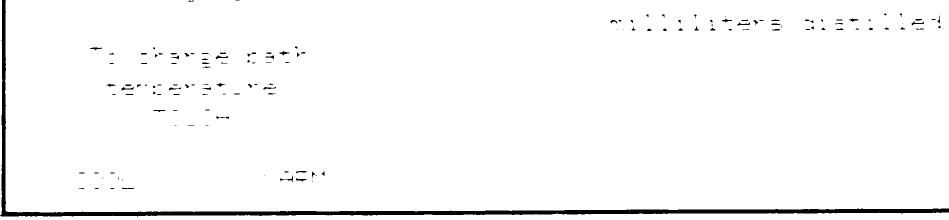
Direct manipulation can be applied to replace traditional question-and-answer computer-assisted instruction with more attractive alternatives. Several CDC Plato lessons employ direct manipulation concepts, enabling students to trace inherited characteristics by breeding drosophila, perform medical procedures to save an emergency room patient, draw and move shapes by finger touches, do chemistry lab projects (see Figure 4), or play games.
Explanations of direct manipulation
Several people have attempted to describe the component principles of direct manipulation. "What you see is what you get," is a phrase used by Don Hatfield of IBM and others to describe the general approach. Hatfield is applying many direct manipulation principles in his work on an advanced office automation system. Expanding Hatfield's premise, Harold Thimbleby of the University of York, England, suggests, "What you see is what you have got." The display should indicate a complete image of what the current status is, what errors have occurred, and what actions are appropriate, according to Thimbleby.
Another imaginative observer of interactive system designs, Ted Nelson, has noticed user excitement over interfaces constructed by what he calls the principle of "virtuality"—a representation of reality that can be manipulated. Rutkowski conveys a similar concept in his principle of transparency: "The user is able to apply intellect directly to the task; the tool itself seems to disappear." MacDonald proposes "visual programming" as a solution to the shortage of application programmers. He feels that visual programming speeds system construction and allows end users to generate or modify applications systems to suit their needs.
Each of these writers has helped increase awareness of the new form that is emerging for interactive systems. Much credit also goes to individual designers who have created systems exemplifying aspects of direct manipulation.
Problem-solving and learning research. Another perspective on direct manipulation comes from psychology literature on problem solving. It shows that suitable representations of problems are crucial to solution finding and to learning.
Polya suggests drawing a picture to represent mathematical problems. This approach is in harmony with Maria Montessori's teaching methods for children. She proposed use of physical objects such as beads or wooden sticks to convey mathematical principles such as addition, multiplication, or size comparison. Bruner extends the physical representation idea to cover polynomial factoring and other mathematical principles. In a recent experiment, Carroll, Thomas, and Malhotra found that subjects given a spatial representation solved problems more rapidly and successfully than subjects given an isomorphic problem with temporal representawith labeled columns for check number, date, payee, and amount. The joystick might be used to scan earlier entries. Changes could be made in place, new entries could be made at the first blank line, and a check mark could be made to indicate verification against a monthly report. Searches for a particular payee could be made by filling in a blank payee field and then typing a question mark.
Bibliographic searching has more elaborate requirements, but a basic system could be built by first showing the user a wall of labeled catalog index drawers. A cursor in the shape of a human hand might be moved over to the section labeled “Author Index” and to the drawer labeled “F-L.” Depressing the button on the joystick or mouse would cause the drawer to open up and reveal an array of index cards with tabs offering a finer index. Moving the cursor-finger and depressing the selection button would cause the actual index cards to appear. Depressing the button while holding a card would cause copying of the card into the user’s notebook, also represented on the screen. Entries in the notebook might be edited to create a printed bibliography or combined with other entries to perform set intersections or unions. Copies of entries could be stored on user files or transmitted to colleagues by electronic mail. It is easy to visualize many alternate approaches, so careful design and experimental testing will be necessary to sort out the successful, comprehensible approaches from the idiosyncratic ones.
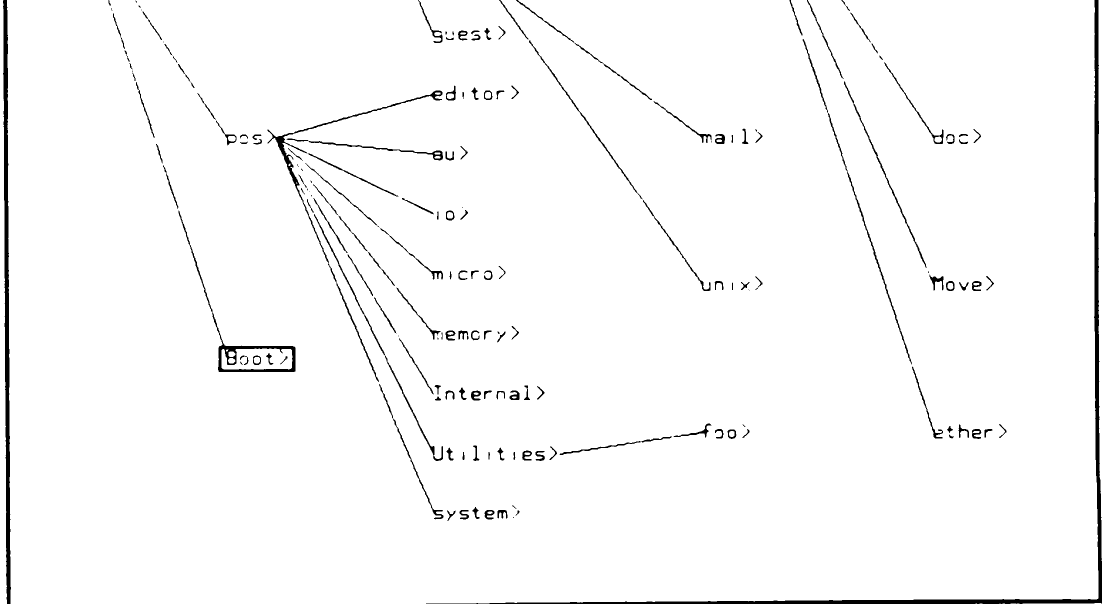
It is possible to apply direct manipulation to environments for which there is no obvious physical parallel. Imagine a job control language that shows the file directory continuously, along with representations of computer components. A new file is created by typing its name into the first free spot in the directory listing. A file name is deleted by blanking it out. Copies are made by locking a cursor onto a file name and dragging it to a picture of a tape drive or a printer. For a hierarchical directory, the roots are displayed until a zoom command causes the next level of the tree to appear. With several presses of the button labeled ZOOM a user should be able to find the right item in the directory, but if he goes down the wrong path, the UNZOOM button will return the previous level. (See Figure 7 for a different approach to hierarchical directories.)
Why not make airline reservations by showing the user a map and prompting for cursor motion to the departing and arriving cities? Then use a calendar to select the date, a clock to indicate the time, and the plane’s seating plan (with diagonal lines across already reserved seats) to select a seat.
Why not take inventory by showing the aisles of the warehouse with the appropriate number of boxes on each shelf? McDonald has combined videodisc and computer graphics technology in a medical supply inventory with a visual warehouse display.
Why not teach students about polynomial equations by letting them bend the curves and watch how the coefficients change, where the -axis intersects, and how the derivative equation reacts?
These ideas are sketches for real systems. Competent designers and implementers must complete the sketches and fill in the details. Direct manipulation has the power
Figure.
Figure 6. This electronic Rolodex or phone-number card file gives users rapid control over the card motion by a forward or backward joystick press. Different commands can be displayed by moving the joystick left or right. The lively motion of the cards and the natural commands appeal to many users. Implemented by Gary Patterson in Basic on an Apple II, this system was part of a course project at the University of Maryland.
Figure.
to attract users because it is comprehensible, natural, rapid, and even enjoyable. If actions are simple, reversibility ensured, and retention easy, then anxiety recedes and satisfaction flows in.
The tremendous growth of interest in interactive system design issues in the research community is encouraging. Similarly, the increased concern for improved human engineering in commercial products is a promising sign. Academic and industrial researchers are applying controlled, psychologically oriented experimentation to develop a finer understanding of human performance and to generate a set of practical guidelines. Commercial designers and implementers are eagerly awaiting improved guidelines and increasingly using pilot studies and acceptance tests to refine their designs.
Interactive systems that display a representation of the object of interest and permit rapid, incremental, reversible operations through physical actions rather than command syntax are attracting enthusiastic users. Immediate visibility of the results of operations and a layered or spiral approach to learning contribute to the attraction. Each of these features needs research to refine our understanding of its contributions and limitations. But even while such research is in progress, astute designers can explore this approach.
The future of direct manipulation is promising. Tasks that could have been performed only with tedious command or programming languages may soon be accessible through lively, enjoyable interactive systems that reduce learning time, speed performance, and increase satisfaction.■
直接操作法:
プログラミング言語を超えて
Ben Shneiderman, University of Maryland
Leibnizは記号の形式がその内容を反映するようにすることを追求した。「記号においては」と彼は記している。「それらが事物の正確な性質を簡潔に表現し、いわばそれを描き出すとき、発見のための利点は最大となる。そのとき、思考の労働は実に驚くほど軽減される。」
Frederick Kreiling, "Leibniz," Scientific American, May 1968
ある種のインタラクティブシステムは、ユーザーから熱烈な支持を引き出す。これは、より一般的に見られる渋々の受容や完全な敵意とは著しい対照をなすものである。熱心なユーザーの報告には、以下に関する肯定的な感情が満ちている。
• システムを習熟していること、
• タスクの実行における能力、
• 最初にシステムを学習し、高度な機能を取り入れることの容易さ、
• 時間が経過しても習熟を維持できる能力への自信、
• システムを使用する楽しさ、
• 初心者にシステムを披露したいという熱意、
• システムのより強力な側面を探索したいという欲求。
もちろん、これらの感情は普遍的なものではないが、その総体は真に満足したユーザーの姿を伝えている。これらの熱心なユーザーと話をし、彼らが使用しているシステムを調査する中で、そのような喜びを生み出す特徴のモデルを構築し始めた。中心となる考えは、関心対象の可視性、迅速で可逆的かつ漸進的な操作、そして複雑なコマンド言語の構文を関心対象の直接操作によって置き換えることであるように思われた。このことから「直接操作」という用語が生まれた。
直接操作システムの例
Acknowledgments
This section is missing here.
References
- Teresa L. Roberts, "Evaluation of Computer Text Editors," PhD dissertation, Stanford University, 1980. Available from University Microfilms, Ann Arbor, Michigan, order number AAD 80-11699.
- John M. Carroll, "Learning, Using and Designing Command Paradigms," Human Learning, Vol. 1, No. 1, 1982, pp. 31-62.
- Christopher F. Herot, "Spatial Management of Data," ACM Trans. Database Systems, Vol. 5, No. 4, Dec. 1980, pp. 493-513.
- Thomas W. Malone, "What Makes Computer Games Fun?" Byte, Vol. 6, No. 12, Dec. 1981, pp. 258-277.
- John M. Carroll and John C. Thomas, "Metaphor and the Cognitive Representation of Computing Systems, IEEE Trans. Systems, Man, and Cybernetics, Vol. SMC-12, No. 2, Mar./Apr. 1982, pp. 107-116.
- Moshe M. Zloof, "Query-by-Example," AFIPS Conf. Proc., Vol. 44, 1975 NCC, AFIPS Press, Montvale, N.J. 1975.
- Moshe M. Zloof, "Office-by-Example: A Business Language that Unifies Data and Word Processing and Electronic Mail, IBM Sys. J., Vol. 21, No. 3, 1982, pp. 272-304.
- Cranfield Smith et al., "Designing the Star User Interface," Byte, Vol. 7, No. 4, Apr. 1982, pp. 242-282.
- Laura Yedwab, Christopher F. Herot, and Ronni L. Rosenberg, "The Automated Desk," Sigsmall Newsletter, Vol. 7, No. 2, Oct. 1981, pp. 102-108.
- Ted Nelson, "Interactive Systems and the Design of Virtuality," Creative Computing, Vol. 6, No. 11, Nov. 1980, pp. 56 ff., and Vol. 6, No. 12, Dec. 1980, pp. 94 ff.
- Chris Rutkowski, "An Introduction to the Human Applications Standard Computer Interface, Part 1: Theory and Principles," Byte, Vol. 7, No. 11, Oct. 1982, pp. 291-310.
- Alan MacDonald, "Visual Programming," Datamation, Vol. 28, No. 11, Oct. 1982, pp. 132-140.
- George Polya, How to Solve It, Doubleday, New York, 1957.
- Maria Montessori, The Montessori Method. Schocken, New York, 1964.
- James Bruner, Toward a Theory of Instruction, Harvard University Press, Cambridge, Mass., 1966.
- John M. Carroll, J. C. Thomas, and A. Malhotra, "Presentation and Representation in Design Problem-Solving," British J. Psych., Vol. 71, 1980, pp. 143-153.
- Rudolf Arnheim, Visual Thinking, University of California Press, Berkeley, Calif., 1972.
- Robert H. McKim, Experiences in Visual Thinking, Brooks/Cole Publishing Co., Monterey, Calif., 1972.
- Max Wertheimer, Productive Thinking, Harper and Row, New York, 1959.
- Seymour Papert, Mindstorms: Children, Computers, and Powerful Ideas, Basic Books, Inc., New York, 1980.
- Ben Shneiderman, R. Mayer, D. McKay, and P. Heller, "Experimental Investigations of the Utility of Detailed Flowcharts in Programming," Comm. ACM, Vol. 20, No. 6, June 1977, pp. 373-381.
- Ben Shneiderman, "Control Flow and Data Structure Documentation: Two Experiments," Comm. ACM, Vol. 25, No. 1, Jan. 1982, pp. 55-63.
- Michael L. Schneider, "Models for the Design of Static Software User Assistance," Directions in Human-Computer Interaction, Albert Badre and Ben Shneiderman, eds., Ablex Publishing Co., Norwood, N.J., 1982.
- Ben Shneiderman and Richard Mayer, "Syntactic/Semantic Interactions in Programmer Behavior: A Model and Experimental Results," Int'l J. Computer and Information Sciences, Vol. 8, No. 3, 1979, pp. 219-239.
- Ben Shneiderman, Software Psychology: Human Factors in Computer and Information Systems, Little, Brown and Co., Boston, Mass., 1980.
- Ben Shneiderman, "A Note on Human Factors Issues of Natural Language Interaction with Database Systems," Information Systems, Vol. 6, No. 2, Feb. 1981, pp. 125-129.
- D. P. Ausubel, Educational Psychology: A Cognitive Approach, Holt, Rinehart and Winston, New York, 1968.
- Richard W. Copeland, How Children Learn Mathematics, third ed., MacMillan, New York, 1979.
- Nancy McDonald, "Multi-media Approach to User Interface," Human Factors in Interactive Computer Systems, Yannis Vassiliou, ed., Ablex Publishing Co., Norwood, N.J., to appear in 1983.
- Ben Shneiderman, "A Computer Graphics System for Polynomials," The Mathematics Teacher, Vol. 67, No. 2, Feb. 1974, pp. 111-113. Ben Shneiderman is an associate professor of computer science at the University of Maryland, where he is pursuing research in the design of interactive computer systems. He is the head of the recently formed Laboratory for Human-Computer Interaction within the Center for Automation Research. Shneiderman is the author of Software Psychology: Human Factors in Computer and Information Systems, the coauthor of several textbooks, and the editor of three collections of papers. He has published more than 80 research journal and conference articles.
Read off the page by a vision model reading the page images using olmOCR-2-7B-1025-FP8.
Read off the page by a vision model reading the page images using olmOCR-2-7B-1025-FP8. Translated into 日本語 by gpt-5, against glossary version 6. Translated from the English.